Get your time back from the apps.
Clarity is an app blocker for Android. Pick the apps that eat your day. Give them a limit, a schedule or a timer. When time's up, Clarity covers them, and built-in analytics show how much time you're getting back.
Free forever for one block. No account needed to start.
What is Clarity?
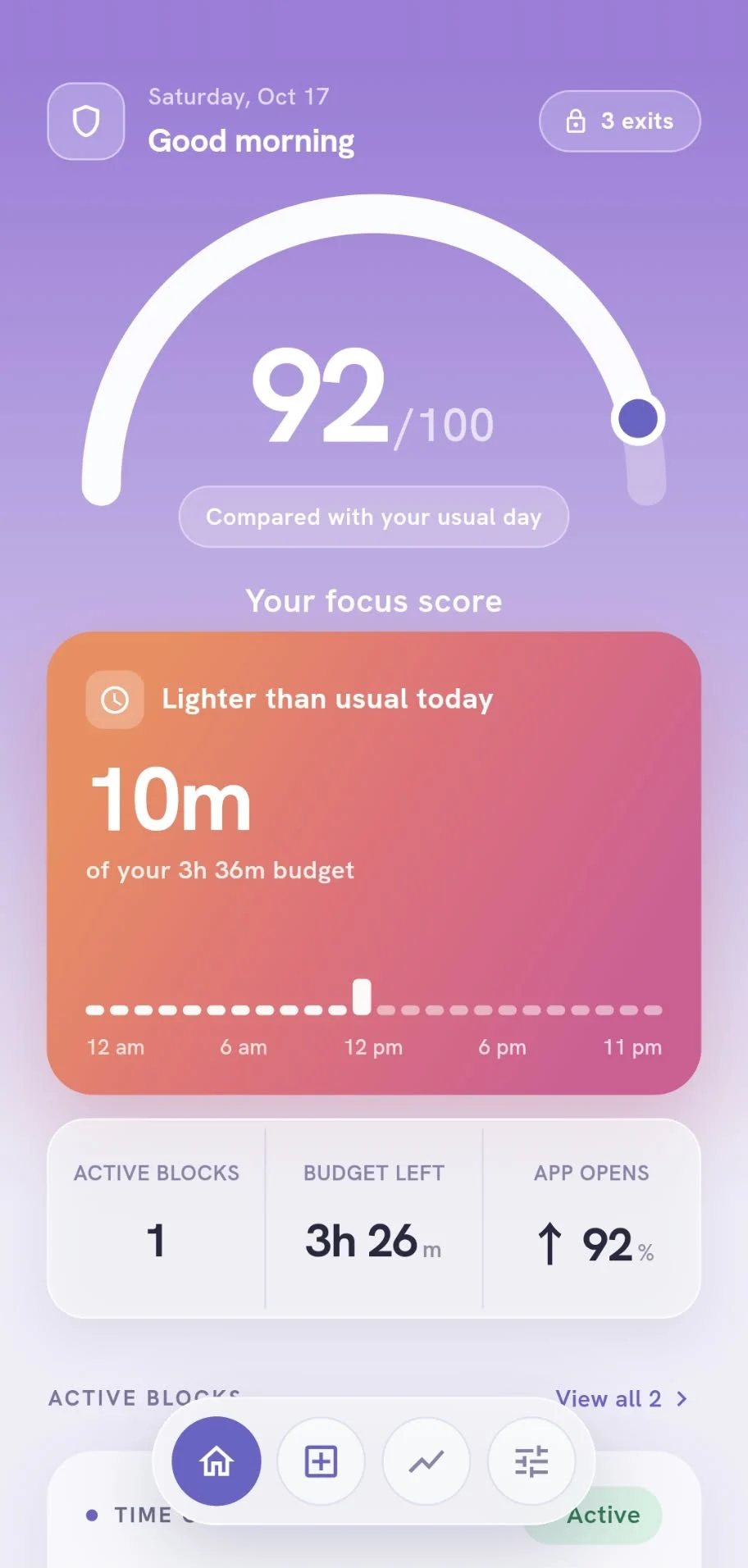
Clarity is an Android app that blocks distracting apps on your terms: a daily time limit, a schedule, or a focus timer. It also tracks your screen time app by app and gives you a daily focus score. Everything runs on your phone.
- Platform
- Android
- Price
- FreePro $29.99/yr or $5.99/mo
- Free trial
- 7 days on the yearly plan
- Block types
- Daily limit, schedule, timer
- Analytics
- Screen time, opens, focus score
- Privacy
- Usage processed on-device
- Account
- Optional
- Setup time
- Under a minute
Your day, your routines, your week.
Set up in under a minute.
Clarity reads the usage your phone already tracks, shows you where your time goes, and turns it into a block that sticks.
See where your time goes.
Your daily average and the three apps that take the most — on one screen.
Set your limit.
Choose a daily budget, a schedule for work or sleep, or a focus timer that starts now.
Clarity covers the app.
Open a blocked app and Clarity steps in the moment it launches. No willpower required.
Hold the line your way.
Pick how a block should hold. Mix them — Pro runs up to 15 at once.
Use some apps less.
Allow a daily budget across chosen apps, then block them until midnight.
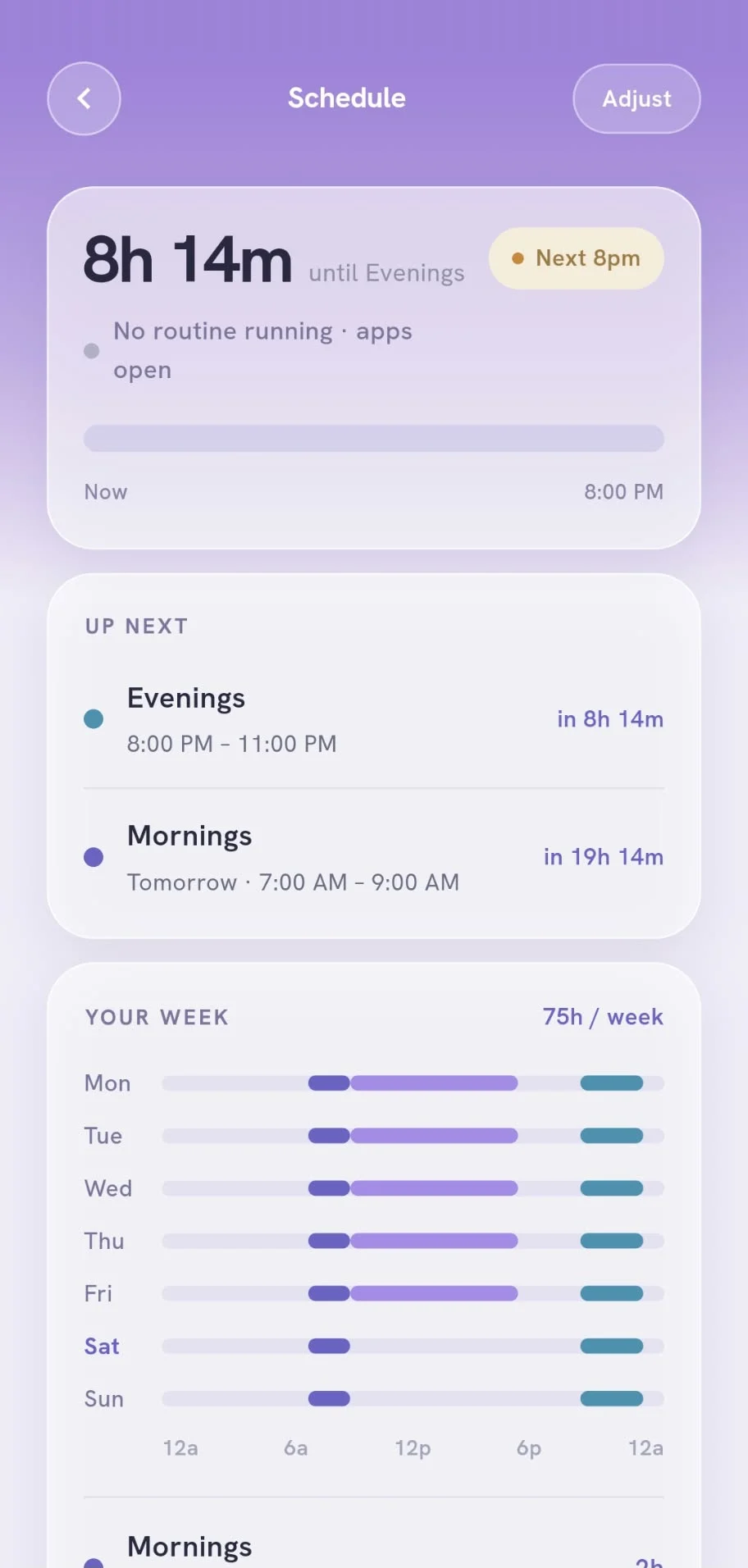
Keep certain hours free.
Block during set hours and days — work, evenings or sleep. Up to five routines.
Focus right now.
Block straight away until the timer runs out. Starts the moment you turn it on.
Know exactly where your time goes.
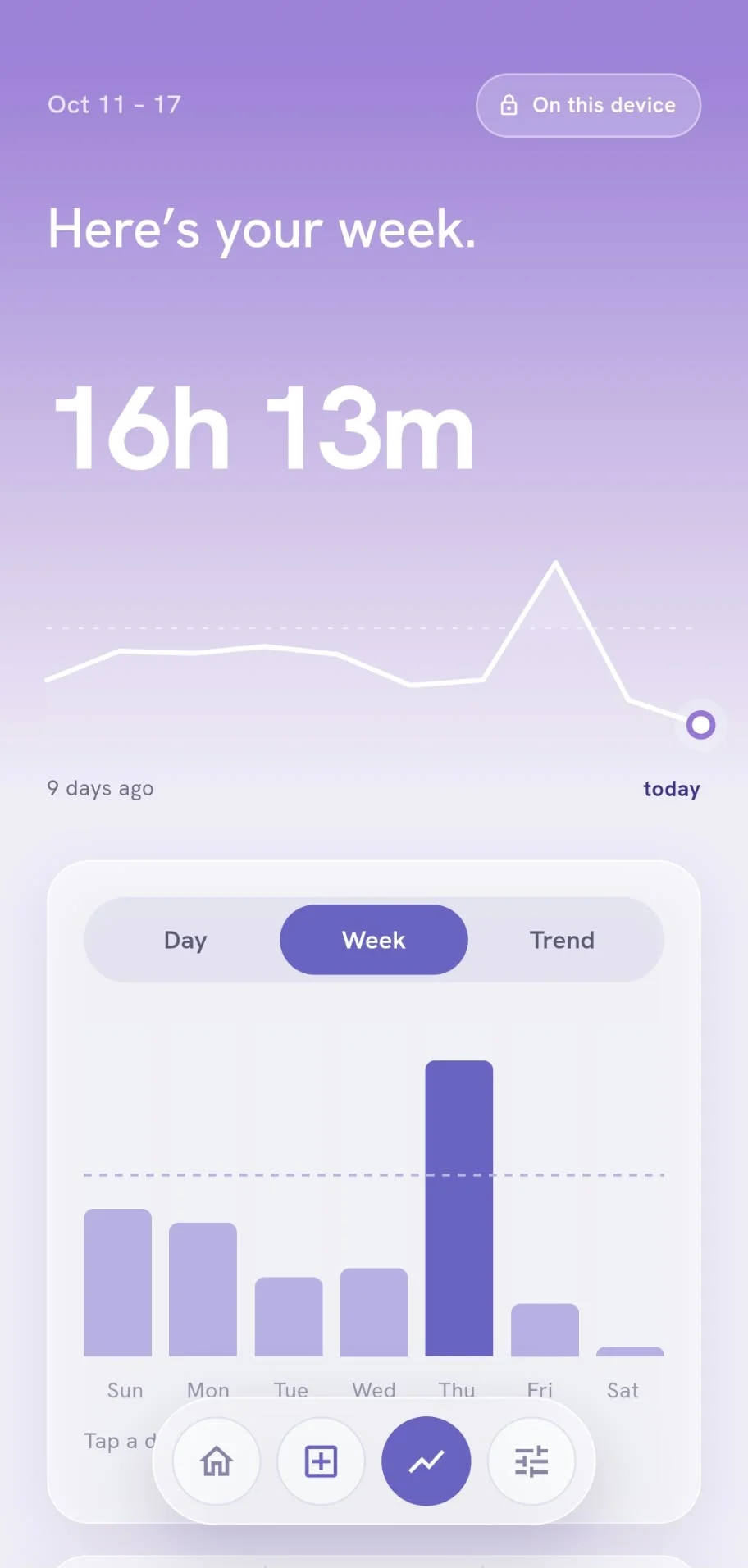
Built-in analytics track your screen time, app by app and hour by hour, so you can see your habits change.
Daily screen time
Spot your heavy days and watch the trend fall as your blocks take hold.
App by app
See which apps take the most, and how often you open them.
Your progress, in hours
Your focus score and the time you've won back, updated every day.
Instagram is blocked.
A gentle wall, right when you need it.
Hold to enable
Turning a block on takes a 5-second press. Turning it off on impulse isn't that easy.
3 emergency exits a week
Really need in? Use an exit. They're limited, so they stay meaningful.
Usage insights
Analytics for screen time, opens and your weekly trend, so you can track how you're doing.
Your usage stays on this phone.
Clarity reads the screen-time record Android already keeps. It's never uploaded, never sold, never shared.
Start free. Go Pro when you're ready.
- One active block
- Daily limit, schedule or timer
- Focus score & usage analytics
- 3 emergency exits a week
- Run up to 15 blocks at once
- Give each app its own limit
- Cover work and sleep with multiple routines
- Sync your setup to any phone
Questions, answered.
What is Clarity?
Clarity is an app blocker for Android. You choose the apps that take your time and give them a daily limit, a schedule or a focus timer. When time is up, Clarity covers the app, and built-in analytics show how much screen time you get back.
Is Clarity free?
Yes. The free plan includes one active block, every block type, screen-time analytics, the focus score and 3 emergency exits a week. Clarity Pro costs $29.99 a year (about $2.50 a month, with a 7-day free trial) or $5.99 a month.
How do I restore my purchase?
Make sure your phone is signed in to the Google account you bought Clarity Pro with, then open Clarity and go to Profile → Restore purchases. If it still doesn't show, email us your Google Play order number (it starts with GPA.).
How do I cancel my subscription?
Open Google Play, tap your profile picture, go to Payments & subscriptions → Subscriptions, choose Clarity and tap Cancel subscription. Uninstalling the app does not cancel it. You keep Pro until the end of the period you've paid for.
How do I delete my data?
Screen-time data never leaves your phone. Uninstall Clarity or clear its storage to remove it. If you have an account, go to Profile → Delete account; we remove your account data from our servers within 30 days.
How do I report a bug?
Email clarity@litlabstudio.com with your phone model, Android version, Clarity version (Profile → About), what happened, and a screenshot if you can.
Is Clarity available on iPhone?
Clarity is built for Android today. Leave your email in the app's account screen and we'll let you know if that changes.
How is Clarity different from Android's built-in Digital Wellbeing?
Clarity is designed to make limits harder to skip on impulse: turning a block on takes a 5-second hold, and you get only 3 emergency exits a week. It also lets you combine daily limits, schedules and timers, run up to 15 blocks with Pro, and track a daily focus score.
What permissions does Clarity need?
Usage access, so it can see how long you use each app, and "display over other apps", so it can cover a blocked app the moment you open it. Allowing it to run in the background keeps blocks on time.
Does Clarity upload my screen-time data?
No. Clarity reads the usage record Android already keeps and processes it on your phone. It is never uploaded, sold or shared.
Will Clarity drain my battery?
No. Clarity only runs while a block is on, and does very little work when it does.
What if I really need to open a blocked app?
You get 3 emergency exits every week. Use one and the app opens; they reset weekly.
How does the free trial work?
The yearly plan starts with 7 days free, with every Pro feature unlocked. We remind you before billing starts, and you can cancel any time in Google Play. The monthly plan has no free trial.
Do I need an account?
No. Create a free one with Google, Apple or email only if you want your blocks and Pro to follow you to another phone.
Your time. Back.
Set your first block tonight. It takes less than a minute.